- Using Less Meeting
- Meeting Tips
How to Add an Agenda to a Google Calendar Invite
By Jeffrey Steinke

Photo by Cabri Caldwell on Unsplash
Google Calendar has no agenda field, so the agenda goes in the event description. Write it in the format below and attendees get a clean, numbered plan right in the invite. If you use Less Meeting, it also becomes the meeting’s agenda in the app, timings included, with no extra step.
Why plan the meeting in the invite?
You can always add tags and an agenda in Less Meeting after the fact. But typing them into the Google Calendar invite when you create it cuts out a step. Attendees see the plan before the meeting starts, right in the invite they already open to accept.
Setting it up
It takes two steps:
1. Sync your Less Meeting and Google Calendar accounts. Connect them here.
2. Type your agenda and tags into the event description, using the format below.
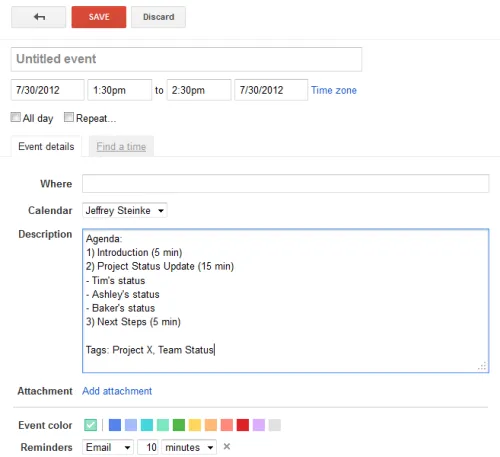
Formatting your agenda & tags
Agenda
- Start with the text “Agenda:”
- Number each item with a right parenthesis: “1)”, “2)”, and so on
- Optional: add a length per item, formatted “(X min)”
- Optional: add sub-items with a leading “- “
Tags
- Start with the text “Tags:”
- Separate each tag with a comma
- Add as many as you need
Goals (optional)
- Start with the text “Goals:”
- Number each goal the same way as the agenda: “1)”, “2)”, and so on
Example
Paste this into the event description and change the items to fit your meeting:
Agenda:
1) Open action items from last week (5 min)
2) Pipeline review (15 min)
- Deals slipping past 30 days
- Next steps on the top three
3) Hiring update (5 min)

Tags: sales, weekly

Goals:
1) Agree which slipping deals get extra help
2) Confirm the hiring plan for next quarter
For topics and timings to start from, the free meeting agenda templates cover eight common meetings. Copy one, then add the colon after “Agenda” and switch its numbering to “1)” so it matches the format above.
That’s it. Less Meeting reads the description automatically and attaches the agenda, tags and goals to the meeting, no copy-paste into the app required.
The same format works in Outlook and Microsoft 365 invites, and in meetings you send through [email protected]. See How can I add an Agenda and Tags to my meeting? for the details.
For the fundamentals of building an agenda worth formatting in the first place, see 7 Steps to a Perfect Meeting Agenda.
Not using Less Meeting yet? Once the agenda is in, it tracks the action items that come out of the meeting and reminds each owner until they’re done. Get started free for 14 days, no credit card required.